Learn feelings, one face at a time. Aprender emociones, una cara a la vez.
Expressions helps children, including children with autism, recognize and build facial expressions. They hear a short story, then put eyebrows, eyes and a mouth on a face to show how someone feels. Expressions ayuda a los niños, también a niños con autismo, a reconocer y formar expresiones faciales. Escuchan una historia corta y luego ponen cejas, ojos y boca en una cara para mostrar cómo se siente alguien.
Try it right herePruébalo aquí mismo
Find the feelingEncuentra la emoción
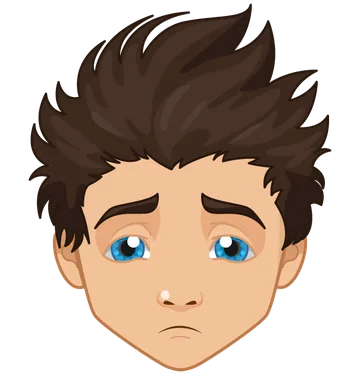
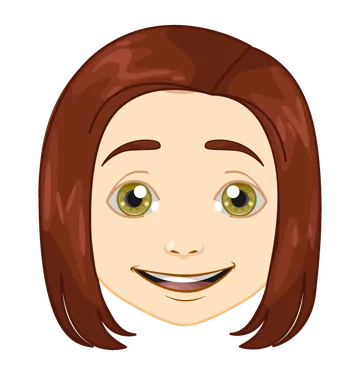
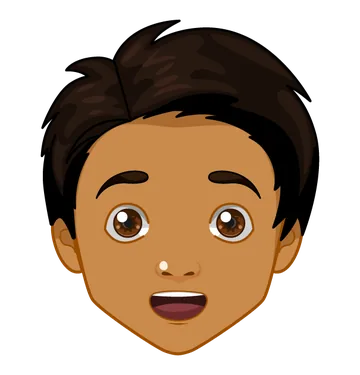
These faces come straight from the app. Read the question and tap the face that matches. Three rounds. Estas caras vienen directamente de la app. Lee la pregunta y toca la cara que corresponde. Tres rondas.
How it worksCómo funciona
Hear the story. Build the face.Escucha la historia. Forma la cara.
Each round is short and predictable, with a friendly voice and clear steps, so it’s easy to start and satisfying to finish.Cada ronda es corta y predecible, con una voz amable y pasos claros, para que sea fácil empezar y agradable terminar.
- 1
Pick a feeling and a levelElige una emoción y un nivel
Every round starts with a short story. In Apprentice, the app then names the feeling to build; in Master, the child works out how the character feels.Cada ronda empieza con una historia corta. En Aprendiz, la app dice luego qué emoción formar; en Maestro, el niño descubre cómo se siente el personaje.
- 2
Build the faceForma la cara
Choose a child’s face, then drag the eyebrows, eyes and mouth onto it. Correct parts snap into place; after a number of wrong tries you choose, the app shows the answer.Elige la cara de un niño y arrastra las cejas, los ojos y la boca. Las piezas correctas encajan; tras el número de intentos fallidos que elijas, la app muestra la respuesta.
- 3
See the sceneMira la escena
The finished face appears in an illustrated scene, with stars if you want them. Then play again or pick another feeling.La cara terminada aparece en una escena ilustrada, con estrellas si quieres. Luego juega otra vez o elige otra emoción.
The feelingsLas emociones
Ten feelings, each with its own stories.Diez emociones, cada una con sus historias.
From the first four every child meets to the subtler ones that are harder to read.Desde las cuatro primeras que todo niño conoce hasta las más sutiles, que cuestan más de leer.
- HappyFelizFreeGratis
- SadTristeFreeGratis
- AngryEnojadoFreeGratis
- ScaredAsustadoFreeGratis
- SurprisedSorprendido
- DisgustAsco
- BoredAburrido
- TiredCansado
- EmbarrassedApenado
- UneasyIncómodo
Happy, sad, angry and scared are free to play. A subscription unlocks the other six.Feliz, triste, enojado y asustado son gratuitas. Una suscripción desbloquea las otras seis.
Thoughtfully madeHecho con cuidado
Calm, adjustable, and built for grown-ups too.Tranquila, ajustable y pensada también para adultos.
Simple screens for children, with everything a parent, teacher or therapist needs tucked safely behind a parent gate.Pantallas sencillas para los niños, y todo lo que necesitan padres, maestros o terapeutas protegido tras un control parental.
English and SpanishInglés y español
Screens, stories and narration in both languages. Switch any time in Settings, whatever language your device uses.Pantallas, historias y narración en los dos idiomas. Cambia cuando quieras en Configuración, sea cual sea el idioma de tu dispositivo.
Student profilesPerfiles de alumnos
A name, a color and a character or photo for each child, so siblings or a whole class can share one device.Nombre, color y un personaje o foto para cada niño, para que hermanos o toda una clase compartan un dispositivo.
Twelve childrenDoce niños
Six girls and six boys with different looks to build faces on, and two stories for every feeling.Seis niñas y seis niños con distinto aspecto para formar caras, y dos historias para cada emoción.
Calm and adjustableTranquila y ajustable
Calm mode turns off looping and big animations. Choose when help appears, whether to show stars, an optional time limit, and music, sound effects and narration.El modo tranquilo quita las animaciones grandes y repetitivas. Elige cuándo aparece la ayuda, si se muestran estrellas, un tiempo límite opcional, y la música, los efectos y la narración.
AccessibleAccesible
VoiceOver can put each part on the face, grown-up screens follow your text size, and the parent gate has a way in for VoiceOver and Switch Control users.Con VoiceOver se puede poner cada pieza en la cara, las pantallas para adultos siguen el tamaño de texto y el control parental tiene una alternativa para quienes usan VoiceOver o Control por botón.
Gentle guidanceAyuda amable
An animated tutorial shows how to drag the first parts, and a Getting Started guide helps grown-ups set things up.Un tutorial animado muestra cómo arrastrar las primeras piezas, y una guía de inicio ayuda a los adultos a prepararlo todo.
For parents and teachersPara familias y docentes
Practice reading faces, again and again.Practicar a leer caras, una y otra vez.
Expressions was designed with experienced autism therapists and institutions in Mexico. It turns a skill many children find hard into a short, calm game.Expressions se diseñó con terapeutas con experiencia en autismo e instituciones de México. Convierte una habilidad que a muchos niños les cuesta en un juego corto y tranquilo.
- Notice how eyebrows, eyes and mouths change with each feelingFijarse en cómo cambian las cejas, los ojos y la boca con cada emoción
- Connect everyday situations to the feelings they causeRelacionar situaciones cotidianas con las emociones que provocan
- Move from naming a feeling to working it out from a storyPasar de nombrar una emoción a descubrirla a partir de una historia
- Adjust help, time and sound to each childAjustar la ayuda, el tiempo y el sonido a cada niño
Private by designPrivada desde el diseño
No ads, no accounts, no analytics and no tracking.Sin anuncios, sin cuentas, sin analítica y sin rastreo.
Students’ names, photos and game records stay on your device. Settings, students, purchases, links and email sit behind a parent gate that young children can’t pass.Los nombres, fotos y registros de juego de los alumnos se quedan en tu dispositivo. La configuración, los alumnos, las compras, los enlaces y el correo están tras un control parental que los niños pequeños no pueden pasar.

Free to startGratis para empezar
Start with four feelings. Unlock all ten.Empieza con cuatro emociones. Desbloquea las diez.
No ads and no surprises: one subscription, monthly or yearly.Sin anuncios ni sorpresas: una suscripción, mensual o anual.
Expressions
Free downloadDescarga gratuita
- Happy, sad, angry and scaredFeliz, triste, enojado y asustado
- Student profilesPerfiles de alumnos
- English and SpanishInglés y español
All feelingsTodas las emociones
Monthly or yearly · free trial for eligible new subscribersMensual o anual · prueba gratis para nuevos suscriptores que cumplan los requisitos
- All ten feelings and their storiesLas diez emociones y sus historias
- Everything in the free appTodo lo de la app gratuita
Prices and any free trial are shown in the app, in your local currency, before you buy. The subscription renews automatically unless cancelled at least 24 hours before the end of the current period; manage it in your Apple Account settings. Your students stay on your device if you stop subscribing. See the Terms of Use.Los precios y la prueba gratuita, si la hay, se muestran en la app, en tu moneda local, antes de comprar. La suscripción se renueva automáticamente salvo que la canceles al menos 24 horas antes del final del periodo; gestiónala en los ajustes de tu cuenta de Apple. Tus alumnos se quedan en tu dispositivo si dejas de suscribirte. Consulta los Términos de uso.
HelpAyuda
Questions and answersPreguntas frecuentes
Can’t find what you need? Write to us and a real person will answer.¿No encuentras lo que buscas? Escríbenos y te responderá una persona.
What is the parent gate?¿Qué es el control parental?
Grown-up areas (Settings, Player Options, adding and editing students, purchases, links and email) are protected by a parent gate: hold down all three locks at the same time until they open. It’s easy for an adult and hard for a young child to do by accident. People who can’t hold three locks, for example with VoiceOver or Switch Control, get a different challenge: type a number that is written out in words.
Las zonas para adultos (Configuración, Opciones del jugador, añadir y editar alumnos, compras, enlaces y correo) están protegidas por un control parental: mantén pulsados los tres candados a la vez hasta que se abran. Es fácil para un adulto y difícil que un niño pequeño lo haga por accidente. Quien no puede pulsar tres candados, por ejemplo con VoiceOver o Control por botón, recibe otro reto: escribir un número que aparece escrito con letras.
How do I restore my subscription on a new device?¿Cómo recupero mi suscripción en un dispositivo nuevo?
Make sure you’re signed in with the same Apple Account you subscribed with, then:
- On the home screen, tap Unlock Expressions (you’ll pass the parent gate).
- Open any locked feeling.
- Tap Restore Purchase.
If the subscription is active, every feeling unlocks right away.
Comprueba que usas la misma cuenta de Apple con la que te suscribiste y luego:
- En la pantalla de inicio, toca Mas Expresiones (pasarás el control parental).
- Abre cualquier emoción bloqueada.
- Toca Restaurar Compra.
Si la suscripción está activa, todas las emociones se desbloquean al momento.
How do I cancel or change my subscription?¿Cómo cancelo o cambio mi suscripción?
Subscriptions are managed by Apple. On your iPhone or iPad, open the Settings app, tap your name, then Subscriptions, and choose Expressions. Cancel at least 24 hours before the end of the current period to avoid the next renewal. Refunds are handled by Apple at reportaproblem.apple.com.
Las suscripciones las gestiona Apple. En tu iPhone o iPad, abre la app Ajustes, toca tu nombre, luego Suscripciones y elige Expressions. Cancela al menos 24 horas antes del final del periodo para evitar la siguiente renovación. Los reembolsos los gestiona Apple en reportaproblem.apple.com.
What happens if my subscription ends?¿Qué pasa si termina mi suscripción?
Happy, sad, angry and scared stay free to play, and your students and their game records are kept. The other six feelings lock again until you subscribe.
Feliz, triste, enojado y asustado siguen siendo gratuitas, y tus alumnos y sus registros de juego se conservan. Las otras seis emociones se vuelven a bloquear hasta que te suscribas.
What is Expressions Full Version?¿Qué es Expressions Full Version?
Expressions Full Version is a separate, paid app on the App Store. It includes all ten feelings, with no subscription and no in-app purchases. If you already have it, you don’t need a subscription in the free app.
Expressions Full Version es una app de pago aparte en la App Store. Incluye las diez emociones, sin suscripción y sin compras dentro de la app. Si ya la tienes, no necesitas suscribirte en la app gratuita.
How do I change the language?¿Cómo cambio el idioma?
Open Settings in Expressions (behind the parent gate) and tap Change Language. Choose English or Spanish; screens, stories and narration switch, whatever language your device uses.
Abre la Configuración de Expressions (tras el control parental) y toca Cambiar lenguaje. Elige inglés o español; las pantallas, las historias y la narración cambian, sea cual sea el idioma de tu dispositivo.
How do I add, edit or delete a student?¿Cómo añado, edito o borro un alumno?
Open Settings in Expressions, then Manage Students. From there you can add a student, change their name, description, color, character or photo, or tap Delete Student. Deleting a student removes their profile, photo and game records from the device; it can’t be undone. The app always keeps at least one student, so add another one before deleting the last.
Abre la Configuración de Expressions y luego Administrar estudiantes. Desde ahí puedes añadir un alumno, cambiar su nombre, descripción, color, personaje o foto, o tocar Eliminar Estudiante. Al eliminar un alumno se borran del dispositivo su perfil, su foto y sus registros de juego; no se puede deshacer. La app siempre conserva al menos un alumno, así que añade otro antes de borrar el último.
Where is my data stored? Does it sync?¿Dónde se guardan mis datos? ¿Se sincronizan?
Students, photos and game records are stored inside the app on your device. EdNinja has no servers that receive them, and the app doesn’t sync between devices. Your data is included in your device’s own iCloud or computer backups, so restoring a backup to a new device brings it back. Deleting the app deletes the data.
Los alumnos, las fotos y los registros de juego se guardan dentro de la app en tu dispositivo. EdNinja no tiene servidores que los reciban y la app no sincroniza entre dispositivos. Tus datos se incluyen en las copias de seguridad de iCloud o del ordenador de tu dispositivo, así que al restaurar una copia en un dispositivo nuevo vuelven. Al borrar la app se borran los datos.
Is Expressions a therapy?¿Expressions es una terapia?
No. Expressions is an educational tool that parents, teachers and therapists can use alongside the support a child already receives. It is not a medical or therapeutic service and doesn’t replace advice from a qualified professional.
No. Expressions es una herramienta educativa que padres, maestros y terapeutas pueden usar junto con el apoyo que el niño ya recibe. No es un servicio médico ni terapéutico y no sustituye el consejo de un profesional cualificado.
Still need help?¿Necesitas más ayuda? Tell us your device and what happened.Cuéntanos tu dispositivo y qué ocurrió.
support@edninja.app
How does this face feel? Let’s find out.¿Cómo se siente esta cara? Vamos a descubrirlo.
Download Expressions for free and start with four feelings.Descarga Expressions gratis y empieza con cuatro emociones.
Prefer to pay once? Expressions Full Version includes every feeling.¿Prefieres pagar una sola vez? Expressions Full Version incluye todas las emociones.